Mergify Queue Command
Add a pull request to a merge queue.
The queue command in Mergify offers users a direct way to interact with the
Mergify merge queue, right from their pull request
comments. By utilizing this command, users can add a pull request to a merge
queue or re-add it after it has been dequeued.
To enter a queue, a pull request must match the queue_conditions of the
targeted queue. See Adding a Pull Request to the Merge
Queue for
more details.
Syntax
Section titled Syntax@mergifyio queue [queue-name]Parameters
Section titled Parameters[queue-name]is an optional queue name. If no queue name is specified, the pull request will be queued in the first queue that matches thequeue_conditions.
Example
Section titled ExampleAdding a Pull Request to a Queue
Section titled Adding a Pull Request to a QueueTo add a pull request to a queue, simply use:
@mergifyio queueThis command will place the pull request in the first queue that matches
queue_conditions.
Adding a Pull Request to a Specific Queue
Section titled Adding a Pull Request to a Specific QueueTo add a pull request to a specific queue, simply use:
@mergifyio queue productionThis command will place the pull request in the production queue as soon as
it passes its queue_conditions.
Re-queuing a Previously Dequeued Pull Request
Section titled Re-queuing a Previously Dequeued Pull RequestIf a pull request was removed from the merge queue — whether due to a failed
check, a flaky test, or a manual dequeue — you can re-add it using the same
queue command:
@mergifyio queueThe command resets the pull request status and places it back in the merge queue, allowing Mergify to retry validation.
Queueing with a Checkbox
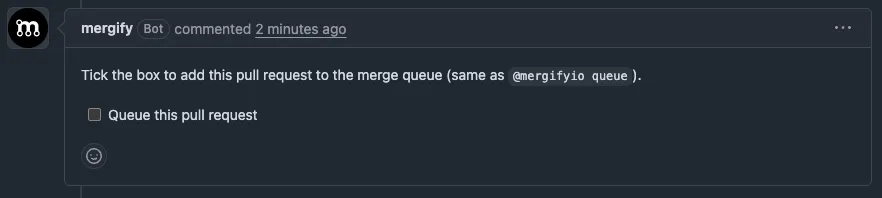
Section titled Queueing with a CheckboxIf you’d rather not type a command, Mergify can post a merge queue status comment with a checkbox you can tick to queue your pull request:
-
Queue this pull request appears when the pull request is ready to be queued. Tick it to add the pull request to the merge queue.
-
Requeue this pull request appears after a pull request leaves the queue following a failed attempt. Tick it to put the pull request back in the queue.
Ticking a checkbox does exactly what the @mergifyio queue command does. The
action is attributed to the person who ticked it, and the same
command restrictions and write-permission checks
apply, so a checkbox can’t queue a pull request that the person couldn’t queue
manually.
This is enabled by default. To turn it off, set queue_controls_comment to
false in your merge_queue configuration:
merge_queue: queue_controls_comment: falseWas this page helpful?
Thanks for your feedback!